在 Cursor 中使用 Design Tokens
如果沒有明確的 design tokens,Cursor 的 Agent 與 Composer 模式很容易退回通用的 Tailwind 灰階、寫死任意十六進位色碼(bg-[#1f2937])、混用不一致的圓角,以及在不同檔案間產出不統一的字型排版。為 Cursor 提供經過驗證的 DESIGN.md,並搭配限定作用域的 .cursor/rules/*.mdc 規則與對應的樣式表變數,就能把視覺一致性變成可落實的契約。
步驟 1:挑選或建立一份 DESIGN.md
你可以從零撰寫 DESIGN.md(參考完整範例),或從 DesignMD Pro 探索目錄挑選真實線上網站的設計系統作為起點:
- 開啟任一網站詳情頁,例如 Linear。
- 在右側的 Use this design 面板中,於 Format for 下拉選單選擇 Cursor。
- 點擊 Copy 複製包裝好的規則內容,或點擊旁邊的下載圖示直接儲存
{slug}-design-system.mdc。
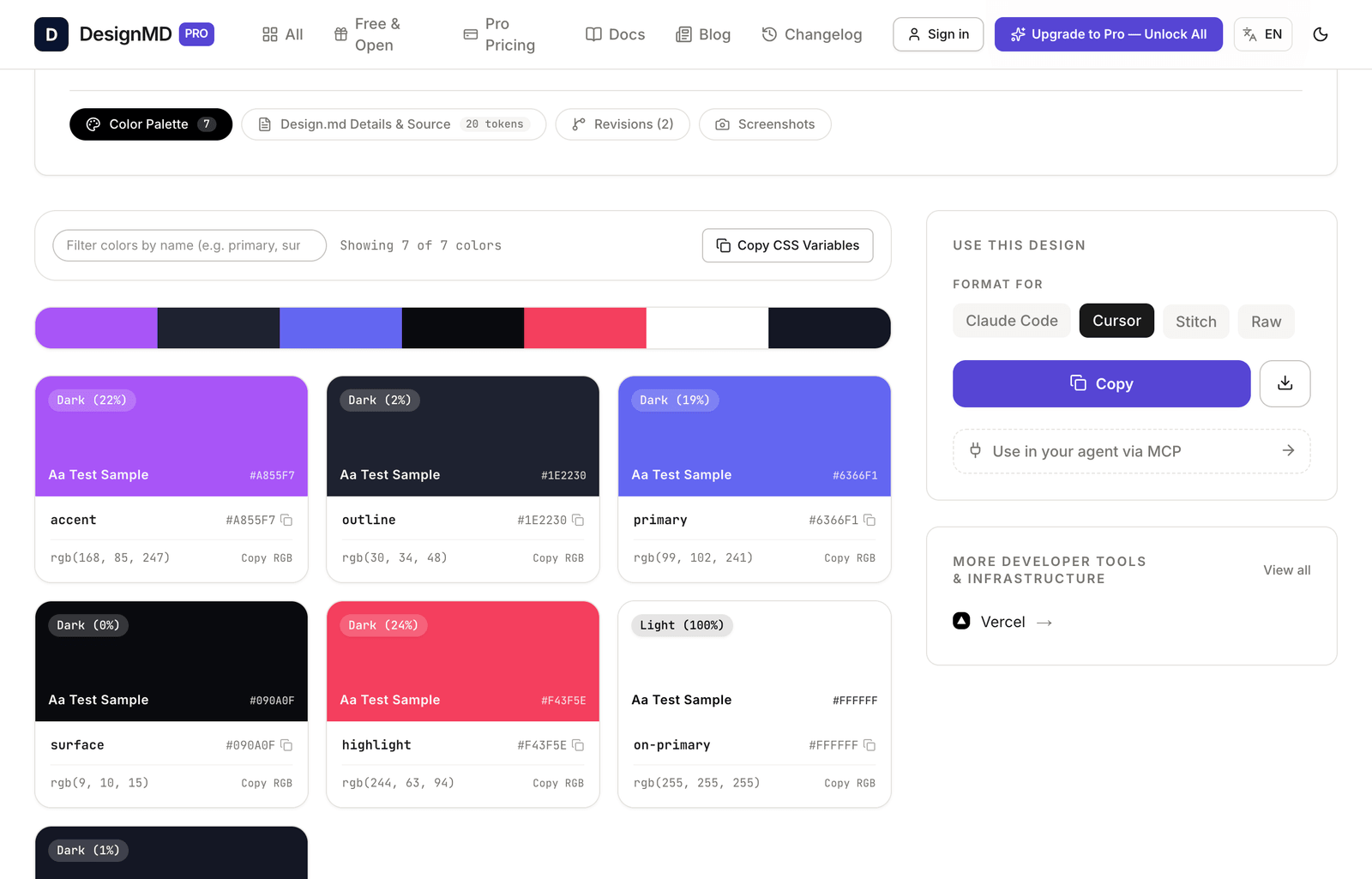
若你偏好在儲存庫根目錄維護獨立的 DESIGN.md(需要與 Claude Code、Codex 或 CI linter 共用同一份規範時特別推薦),請選擇 Raw 或直接下載 /websites/linear.md。
步驟 2:載入 Cursor 前先驗證 Tokens
切勿將未經驗證的 token 檔案交給 Cursor。只要有一處 YAML 縮排錯誤、未解析的 {colors.primary} 引用,或低對比度的前背景配對,錯誤就會擴散到 Cursor 寫出的每一個元件。
- 開啟 DESIGN.md 驗證器。
- 將你的
DESIGN.md貼入或拖曳至左側編輯器(或點擊 Load a DESIGN.md example 檢視標準範本)。 - 確認右側面板顯示 Spec is valid 且
0 errors,檢視 token/色彩/元件摘要,並檢查 Contrast pairs 表格,確認每組文字/背景配對皆符合 WCAG AA(>= 4.5:1)或 AAA(>= 7:1)。
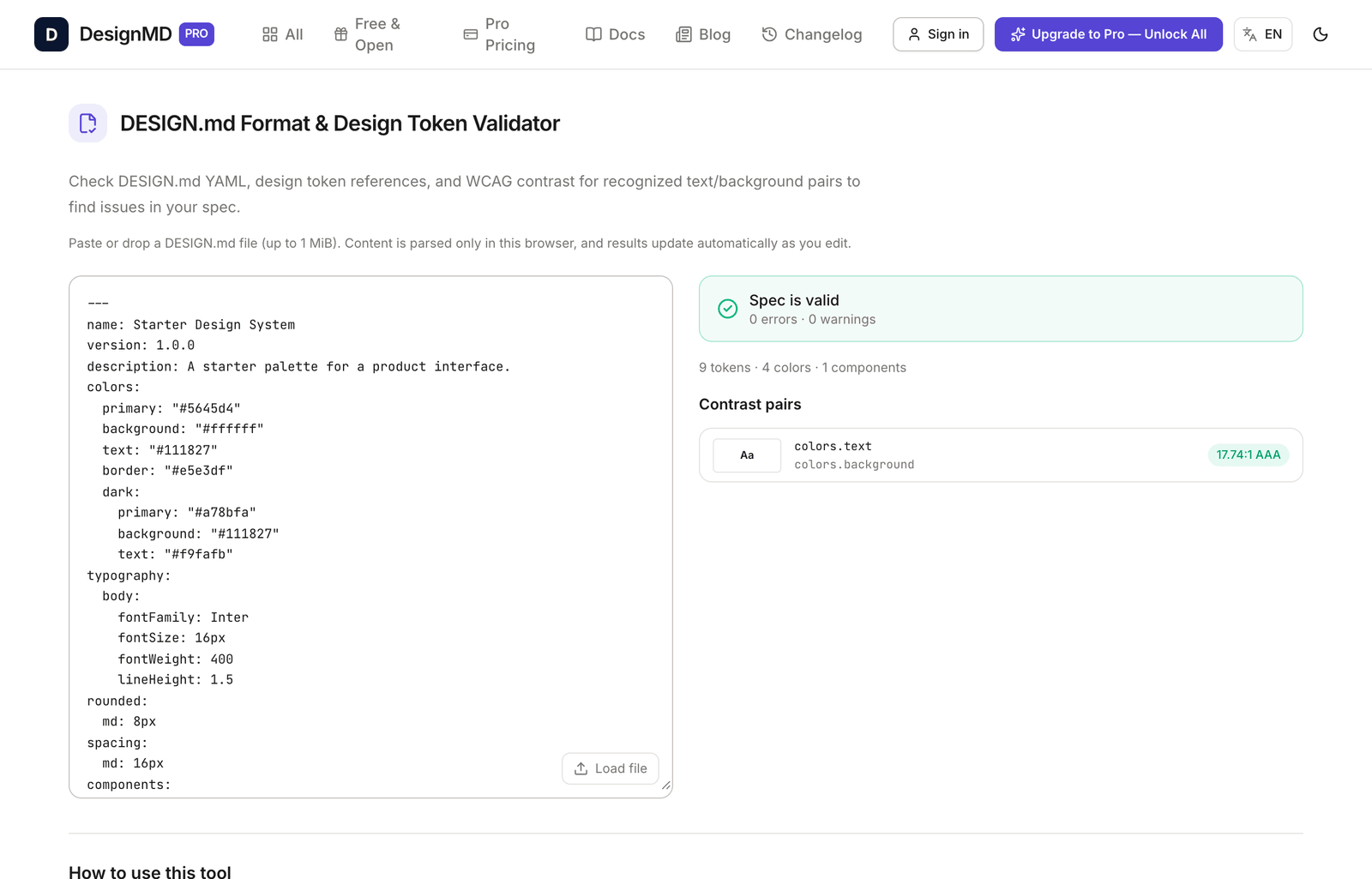
確切的規則定義與 CLI 旗標(npx @google/design.md lint DESIGN.md)請參閱驗證器與 Lint 規則。
步驟 3:設定 .cursor/rules/design-system.mdc
將 DESIGN.md 放在儲存庫根目錄,並在 .cursor/rules/ 下新增規則檔,讓 Cursor 在你編輯 UI 檔案時自動載入設計系統:
my-app/
├── DESIGN.md
└── .cursor/
    └── rules/
        └── design-system.mdc
全端儲存庫建議做法(Glob 限定作用域)
讓 .cursor/rules/design-system.mdc 指向 DESIGN.md 並設定明確的前端 globs,避免 Cursor 在你撰寫資料庫遷移或 API 路由時,把上下文 tokens 浪費在色彩與字型排版上:
---
description: Project design system (DESIGN.md) — apply to all UI components, pages, and stylesheets
globs:
  - "src/components/**/*.tsx"
  - "src/app/**/*.tsx"
  - "src/app/**/*.css"
alwaysApply: false
---

Read `DESIGN.md` at the repository root before creating or modifying UI.

Rules:

- Use only the color, typography, radius, and spacing tokens defined in `DESIGN.md` (via our CSS variables / Tailwind `@theme` utilities).
- Never introduce arbitrary hex values (`bg-[#...]`), ad-hoc border radii, or new font families outside the spec.
- Follow the Components and Do's and Don'ts sections in `DESIGN.md`.
純 UI 專案快速設定(獨立自包含)
如果你在步驟 1 已從 DesignMD Pro 探索目錄匯出 {slug}-design-system.mdc,可直接放入 .cursor/rules/。該檔案預設啟用 alwaysApply: true 並內嵌完整規範。
請避免使用舊版的根目錄 .cursorrules 檔案。單一 .cursorrules 缺乏 glob 作用域限制,會將視覺樣式指令注入所有非 UI 工作階段。
步驟 4:將 DESIGN.md 搭配真實 CSS 或 Tailwind Tokens
當 DESIGN.md 中命名的 tokens 同時以真實樣式表變數存在於儲存庫時,Cursor 的輸出會穩定得多。將同一份通過驗證的 DESIGN.md 編譯進專案 CSS:
- 使用 Tailwind CSS v4?透過 Tailwind CSS v4 主題產生器匯出
@theme區塊。 - 使用純 CSS 或 CSS Modules?透過 CSS 變數產生器匯出
:root與.dark自訂屬性。
兩者到位後,DESIGN.md 負責告訴 Cursor 每個角色該用「哪個」token 以及「為何」使用,而樣式表則在建置與執行期保證精確的算繪數值。
步驟 5:讓 Cursor 嚴守 Tokens 的提示詞模式
即使已啟用 .cursor/rules/design-system.mdc,在複雜任務的提示詞中明確引用檔案仍能顯著提升遵循度:
建置新頁面
@DESIGN.md Build the billing settings page using our existing card, button, and badge components.
Map every background, border, and text color to tokens defined in DESIGN.md and verify dark-mode overrides.
稽核既有元件是否偏離 Tokens
@DESIGN.md Audit src/components/pricing-table.tsx against our design system.
List any hardcoded hex colors, non-standard radii, or typography sizes not defined in DESIGN.md,
then refactor them to use our theme tokens.
透過 MCP 即時拉取參考規範
如果在 ~/.cursor/mcp.json 中連線 DesignMD Pro MCP 伺服器,Cursor 還能不離開編輯器就按需搜尋真實網站規範。
在 CI 中防止規範漂移
在 Pull Request 檢查中加入官方 linter,確保修改 DESIGN.md 時不會破壞語法或 {token} 引用:
npx @google/design.md lint DESIGN.md立即試用工具
在將 DESIGN.md 接入 .cursor/rules/ 之前,先檢查 YAML 錯誤、失效的 {token} 引用與 WCAG 對比度問題:
- 開啟 DESIGN.md 驗證器 —— 在瀏覽器本機驗證檔案並即時取得對比度回饋。
- Cursor 整合參考文件 —— MCP 伺服器 JSON 設定、API 金鑰標頭與更多 Cursor 範本。
- 瀏覽 DesignMD Pro 探索目錄 —— 下載源自真實線上網站、開箱即用的 Cursor
.mdc檔案。