How to Extract Colors from a Website
Sampling pixels from a screenshot with an eyedropper only gives you unranked hex codes—it misses CSS custom property names, dark-mode overrides, hover states, and which color actually serves as the primary brand accent versus a one-off illustration fill.
To build a reusable palette or a DESIGN.md token set, extract colors directly from the site’s CSS declarations and computed styles. Below are three reliable methods depending on how the target site renders its styles.
Method 1: Automated extraction with Color Palette Extractor
For any public website that ships standard CSS stylesheets (Tailwind, CSS Modules, Sass, or hand-written CSS), the fastest approach is static stylesheet analysis with the Color Palette Extractor.
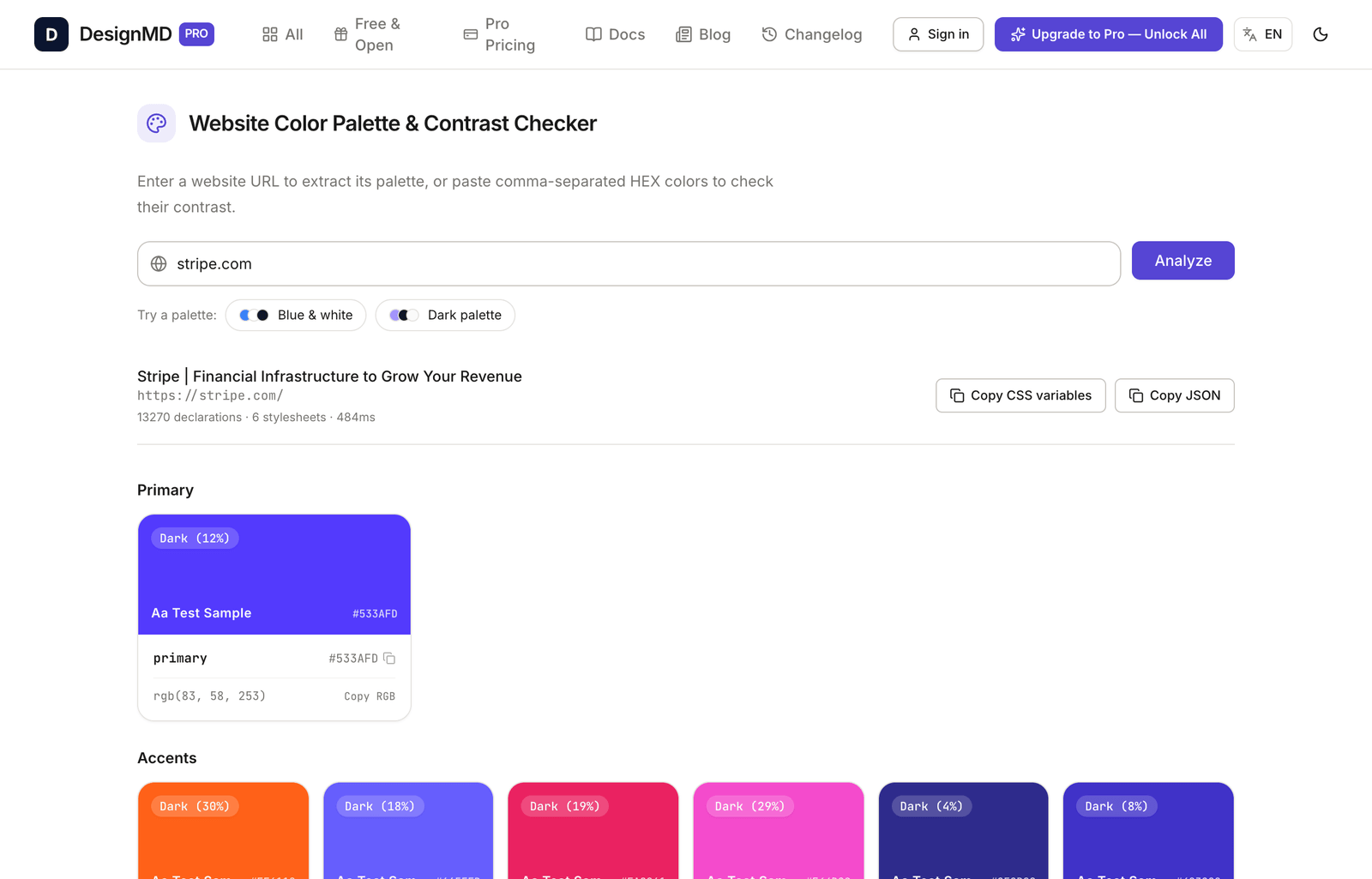
- Open /palette and enter a bare domain (for example
stripe.com) or full URL, then click Analyze. - The extractor fetches the page HTML and linked stylesheets, resolves CSS custom properties (
var(--*)), and ranks colors by weighted usage across selectors and properties. - Inspect the role-classified groups—Primary, Accents, Neutrals, Surfaces, and Texts—and click any swatch to copy its HEX or RGB value, or use Copy CSS variables / Copy JSON to export the entire result at once.
Scroll down on the same result page to inspect two more outputs before picking your tokens:
- CSS Variables: the site’s original custom property names resolved to hex values (for example
--hds-color-core-brand-600 #533AFDor--hds-color-text-solid #061B31). These names reveal the original team’s semantic intent far better than raw hex codes. - WCAG Contrast Matrix: an automatic foreground-against-background contrast table marking every pair as
AAA(>= 7:1),AA(>= 4.5:1),AA+(large text only,>= 3:1), or fail (×). You can also paste your own comma-separated hex list into the search bar to audit contrast without fetching a URL.
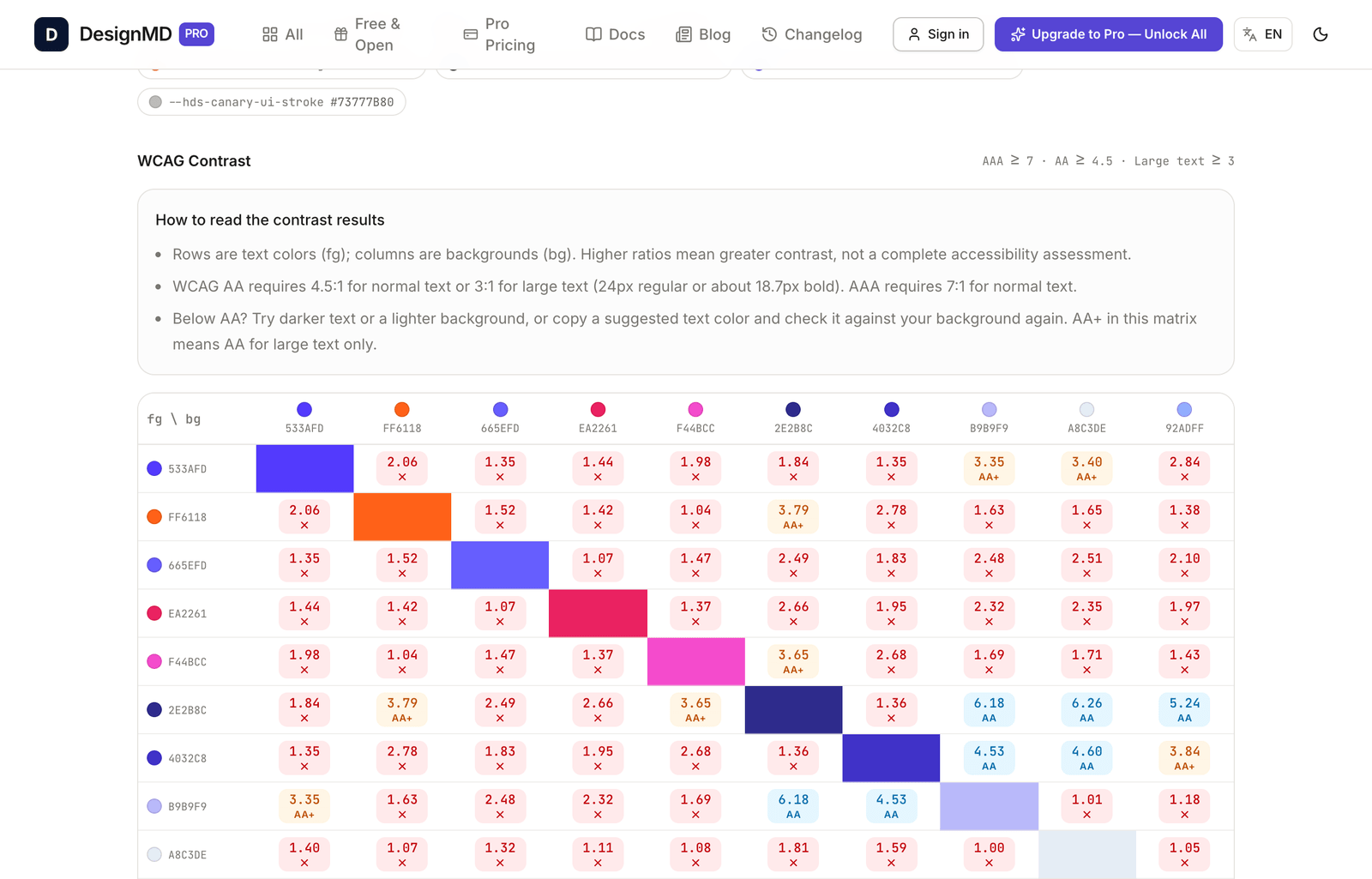
Static extraction reads HTML and linked .css files without running JavaScript. If a target site injects all styles dynamically via a runtime CSS-in-JS library or renders behind authentication, use Method 2 in your browser.
Method 2: Chrome DevTools (for runtime CSS-in-JS or authenticated pages)
When colors are computed at runtime or behind a login wall, inspect the live DOM directly inside Chrome DevTools:
Option A: CSS Overview panel
- Open DevTools (
Cmd+Option+Ion macOS,Ctrl+Shift+Ion Windows/Linux). - Press
Cmd+Shift+P(Ctrl+Shift+P), type Show CSS Overview, and press Enter. - Click Capture overview and select the Colors section.
DevTools groups every rendered color into Background colors, Text colors, Fill colors, and Border colors, and flags low-contrast text nodes on the page. Clicking any swatch highlights the matching elements in the DOM.
Option B: Audit :root custom properties and computed colors via Console
Paste this snippet in the DevTools Console to list every declared --* color variable on :root alongside the most frequent computed text and background colors on visible elements:
// 1. Collect color-like CSS custom properties on :root
const rootStyle = getComputedStyle(document.documentElement);
const vars = [];
for (const sheet of document.styleSheets) {
  try {
    for (const rule of sheet.cssRules) {
      if (rule.selectorText === ":root") {
        for (const prop of rule.style) {
          if (prop.startsWith("--")) {
            const val = rootStyle.getPropertyValue(prop).trim();
            if (/^(#|rgb|hsl|oklch)/i.test(val)) vars.push([prop, val]);
          }
        }
      }
    }
  } catch {
    // Cross-origin stylesheet without CORS headers
  }
}
console.table(vars.slice(0, 30));

// 2. Count computed background & text colors across rendered elements
const counts = new Map();
for (const el of document.querySelectorAll("*")) {
  const s = getComputedStyle(el);
  for (const key of ["color", "backgroundColor", "borderTopColor"]) {
    const c = s[key];
    if (c && c !== "rgba(0, 0, 0, 0)" && c !== "transparent") {
      counts.set(c, (counts.get(c) || 0) + 1);
    }
  }
}
console.table([...counts.entries()].sort((a, b) => b[1] - a[1]).slice(0, 20));
This gives you exact rendered values even for CSS-in-JS apps, shadow DOM components, or pages that rewrite inline styles with JavaScript.
Method 3: Programmatic extraction via REST API or MCP
If you are building an automated audit script or want an AI coding agent to pull a site’s palette directly, call the free unauthenticated REST endpoint:
curl -s "https://designmdpro.app/api/palette?url=stripe.com&limit=16" | jq '{
  primary: .data.groups.primary,
  accents: .data.groups.accents[:4],
  neutrals: .data.groups.neutrals[:4],
  variables: .data.variables[:6]
}'
For AI coding agents connected to the DesignMD Pro MCP server, Pro API keys also unlock the extract-color-palette tool with the same role classification and dark-mode detection. See the Color Palette Extractor reference for the full PaletteResult schema and rate limits.
Turn extracted colors into semantic DESIGN.md tokens
Raw extracted palettes typically contain 30 to 100 shades. Before dropping colors into a codebase or passing them to an AI coding agent, collapse them into 6–10 semantic roles so every color has an unambiguous job:
---
name: Meridian Payments
version: 1.0.0
colors:
  primary: "#533afd"
  on-primary: "#ffffff"
  background: "#ffffff"
  surface: "#f8fafd"
  text: "#061b31"
  muted: "#50617a"
  border: "#e5edf5"
  accent: "#ff6118"
---
Follow three quick checks while pruning:
- Deduplicate near-identical grays: sites often accumulate
#f8f9fa,#f8fafd, and#f9fafbacross legacy pages—keep one surface neutral. - Pair foreground and background roles explicitly: use keys like
text,muted,background,surface, andon-primaryso contrast linters and theme generators recognize each pair automatically. - Separate dark-mode overrides under
colors.dark: if the site provides a dark theme, nest dark values undercolors.darkrather than mixing light and dark hexes in one flat list.
Try the tool
Extract a ranked palette, resolved CSS variables, and a WCAG contrast matrix from any URL in seconds:
- Open the Color Palette Extractor — paste any URL or comma-separated hex list to extract roles and check WCAG contrast.
- Next: How to Extract Typography from a Website — pair your palette with extracted font families and a type scale.
- Color Palette API & MCP Reference — integrate
/api/paletteorextract-color-paletteinto scripts and agents.