Design Tokens for Cursor
Without explicit design tokens, Cursor’s Agent and Composer modes default to generic Tailwind grays, arbitrary hex codes (bg-[#1f2937]), inconsistent border radii, and mismatched typography across files. Giving Cursor a validated DESIGN.md—paired with a scoped .cursor/rules/*.mdc rule and matching stylesheet variables—turns visual consistency into an enforceable contract.
Step 1: Pick or create a DESIGN.md
You can author a DESIGN.md from scratch (see the Complete Example) or start from a real production design system in DesignMD Pro Discovery:
- Open any site page such as Linear.
- In the Use this design panel on the right, select Cursor under Format for.
- Click Copy to copy the wrapped rule content, or click the download icon next to it to save
{slug}-design-system.mdcdirectly.
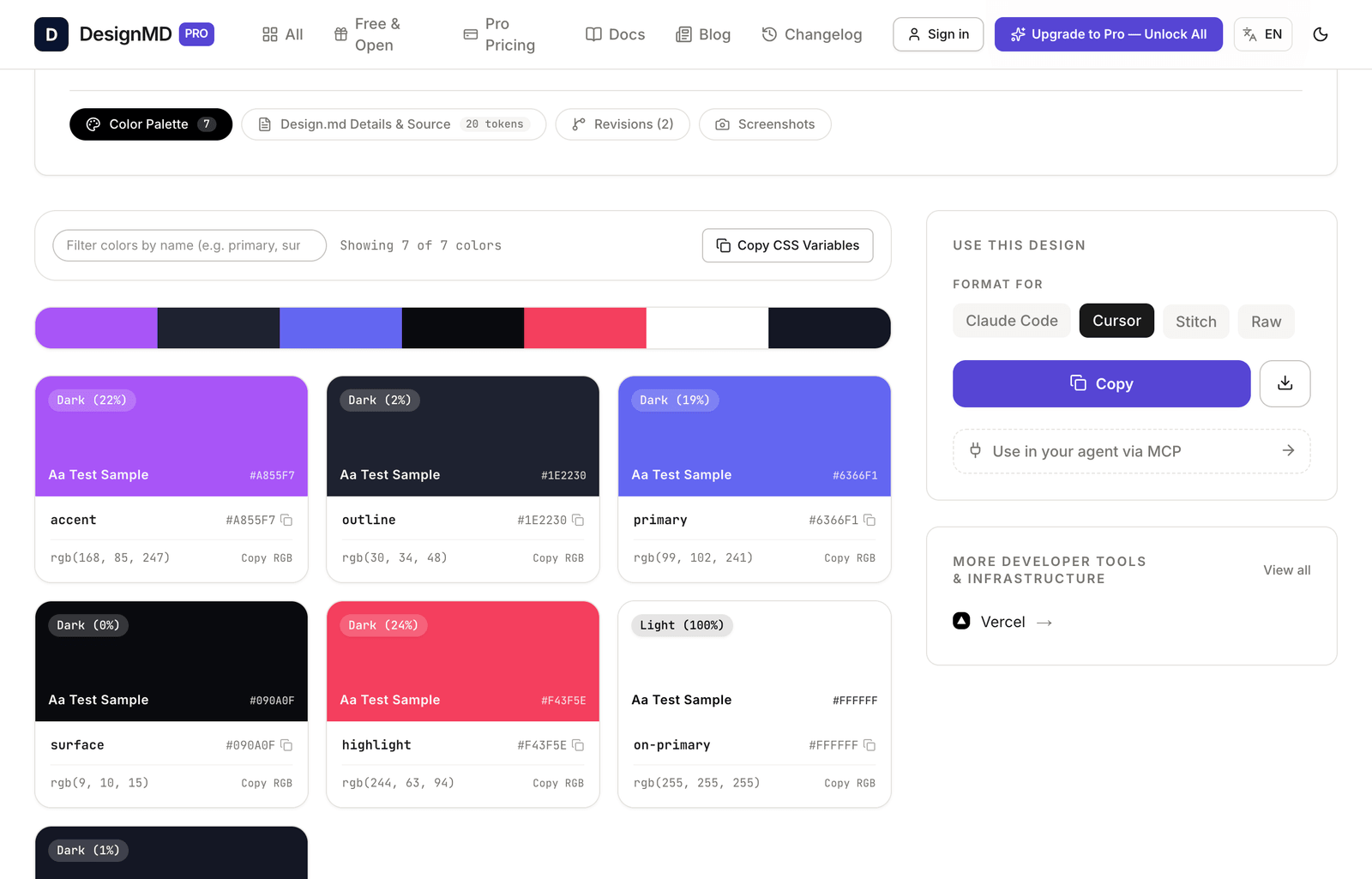
If you prefer keeping a standalone DESIGN.md at the repository root (recommended when sharing the spec with Claude Code, Codex, or CI linters), choose Raw or download /websites/linear.md directly.
Step 2: Validate your tokens before loading them into Cursor
Never hand Cursor an unvalidated token file. A single YAML indentation mistake, an unresolved {colors.primary} reference, or a low-contrast foreground/background pair will propagate into every component Cursor writes.
- Open the DESIGN.md Validator.
- Paste or drop your
DESIGN.mdinto the left editor (or click Load a DESIGN.md example to see a clean baseline). - Verify the right panel shows Spec is valid with
0 errors, check the token/color/component summary, and review the Contrast pairs table to confirm every text/background combination passes WCAG AA (>= 4.5:1) or AAA (>= 7:1).
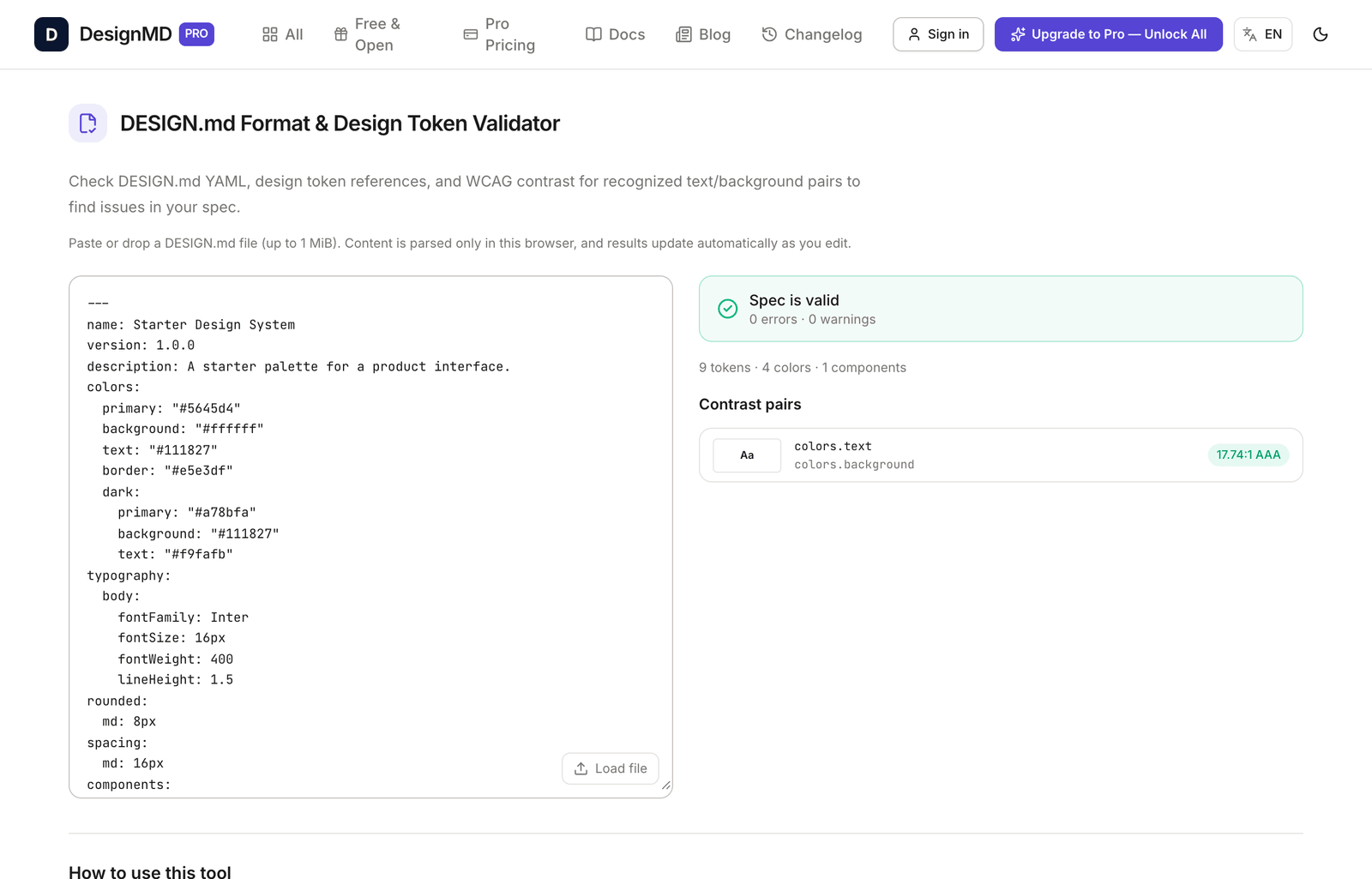
For exact rule definitions and CLI flags (npx @google/design.md lint DESIGN.md), see Validator & Lint Rules.
Step 3: Wire .cursor/rules/design-system.mdc
Place DESIGN.md at the repository root and add a rule file under .cursor/rules/ so Cursor loads your design system automatically whenever you edit UI files:
my-app/
├── DESIGN.md
└── .cursor/
    └── rules/
        └── design-system.mdc
Recommended for full-stack repositories (glob-scoped)
Point .cursor/rules/design-system.mdc at DESIGN.md with explicit frontend globs so Cursor does not spend context tokens on colors and typography when you are writing database migrations or API routes:
---
description: Project design system (DESIGN.md) — apply to all UI components, pages, and stylesheets
globs:
  - "src/components/**/*.tsx"
  - "src/app/**/*.tsx"
  - "src/app/**/*.css"
alwaysApply: false
---

Read `DESIGN.md` at the repository root before creating or modifying UI.

Rules:

- Use only the color, typography, radius, and spacing tokens defined in `DESIGN.md` (via our CSS variables / Tailwind `@theme` utilities).
- Never introduce arbitrary hex values (`bg-[#...]`), ad-hoc border radii, or new font families outside the spec.
- Follow the Components and Do's and Don'ts sections in `DESIGN.md`.
Quick setup for UI-only projects (self-contained)
If you exported {slug}-design-system.mdc from DesignMD Pro Discovery in Step 1, drop it straight into .cursor/rules/. It ships with alwaysApply: true and embeds the full spec inline.
Avoid the legacy root .cursorrules file. Single-file .cursorrules lacks glob scoping and injects visual styling instructions into every non-UI session.
Step 4: Pair DESIGN.md with real CSS or Tailwind tokens
Cursor stays far more consistent when the tokens named in DESIGN.md also exist as real stylesheet variables in your repository. Compile the same validated DESIGN.md into your project’s CSS:
- Using Tailwind CSS v4? Export an
@themeblock via the Tailwind CSS v4 Theme Generator. - Using plain CSS or CSS Modules? Export
:rootand.darkcustom properties via the CSS Variables Generator.
With both files in place, DESIGN.md tells Cursor which token belongs in each role and why, while your stylesheet guarantees exact rendered values at build and runtime.
Step 5: Prompt patterns that keep Cursor on-token
Even with .cursor/rules/design-system.mdc active, explicit references in complex prompts improve adherence:
Building a new page
@DESIGN.md Build the billing settings page using our existing card, button, and badge components.
Map every background, border, and text color to tokens defined in DESIGN.md and verify dark-mode overrides.
Auditing an existing component for token drift
@DESIGN.md Audit src/components/pricing-table.tsx against our design system.
List any hardcoded hex colors, non-standard radii, or typography sizes not defined in DESIGN.md,
then refactor them to use our theme tokens.
Pulling fresh references via MCP
If you connect the DesignMD Pro MCP server in ~/.cursor/mcp.json, Cursor can also search real website specs on demand without leaving the editor.
Guard against drift in CI
Add the official linter to your pull-request check so edits to DESIGN.md cannot break syntax or {token} references:
npx @google/design.md lint DESIGN.mdTry the tool
Check your DESIGN.md for YAML errors, broken {token} references, and WCAG contrast issues before wiring it into .cursor/rules/:
- Open the DESIGN.md Validator — validate your file locally in the browser with instant contrast feedback.
- Cursor Integration Reference — MCP server JSON config, API key headers, and extra Cursor templates.
- Browse DesignMD Pro Discovery — download ready-to-drop Cursor
.mdcfiles from real production websites.