DESIGN.md vs AGENTS.md vs CLAUDE.md: What Each File Owns
When setting up a repository for AI coding agents, it is easy to end up with three similarly named Markdown files—DESIGN.md, AGENTS.md, and CLAUDE.md—and no clear rule on where a new instruction belongs.
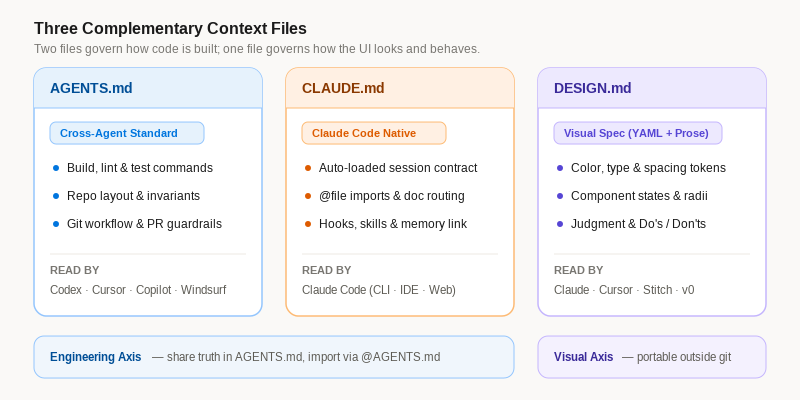
The short answer is that AGENTS.md and CLAUDE.md live on the same engineering axis, while DESIGN.md owns an orthogonal visual axis:
AGENTS.mdis the cross-agent baseline for how the repository is built, tested, and modified.CLAUDE.mdis Claude Code’s native session contract and routing layer (and works cleanly as a thin wrapper that imports@AGENTS.md).DESIGN.mdis a structured, portable specification (YAML tokens plus design rationale) for how the user interface looks, reads, and behaves.
Treating these three files as separate layers prevents duplicate rules, keeps non-UI sessions lean, and allows your visual spec to travel outside git to tools like Google Stitch, v0, or standalone design-generation workflows.
1. Side-by-Side Comparison
| Dimension | AGENTS.md | CLAUDE.md | DESIGN.md |
|---|---|---|---|
| Primary scope | Build commands, tests, directory layout, code invariants, PR workflow | Claude Code session behavior, @file imports, hooks, skills, memory linkage | Color palette, typography, spacing, radii, motion, component specs, visual Do’s & Don’ts |
| Standard / origin | Open cross-tool convention (supported by Codex, Cursor, Copilot, Windsurf, etc.) | Anthropic Claude Code native memory & instruction mechanism | Open format specification from Google Labs (google-labs-code/design.md, Apache-2.0) |
| Structure | Free-form Markdown | Free-form Markdown with @path file import syntax | Hybrid: YAML front matter / fenced token blocks + up to 10 ordered prose sections |
| Machine validation | None (prose read by the model) | None (prose read by the model) | Reference CLI (npx @google/design.md lint / diff), WCAG contrast checks, schema parsing |
| Loading mechanism | Auto-discovered from repo root and nested subdirectories by supporting tools | Auto-loaded at session start (root, parent, and local overrides) | Referenced by CLAUDE.md / AGENTS.md / Cursor rules, or supplied directly via URL / paste |
| Primary authors | Engineers | Engineers (paired with Claude’s Auto Memory MEMORY.md) | Designers and frontend engineers |
| Portability outside git | Low (tightly coupled to repo paths and scripts) | Low (tied to local repo and Claude Code runtime) | High (works standalone in Stitch, v0, Claude web chat, or at a public URL like vercel.com/design.md) |
2. AGENTS.md vs CLAUDE.md: Open Baseline vs. Native Runtime Contract
The frequent source of confusion between AGENTS.md and CLAUDE.md is that they solve overlapping problems at different layers of ecosystem compatibility.
What AGENTS.md is for
AGENTS.md emerged as a tool-agnostic standard so teams do not have to rewrite identical project rules across .cursorrules, .github/copilot-instructions.md, and vendor-specific files. It functions as a README.md written for coding agents instead of human onboarding:
- Exact package manager, build, lint, and test commands (
pnpm type-check,pnpm --filter @designmdpro/web exec tsx --test ...) - Architectural invariants that cannot be inferred quickly from file names (for instance, “never edit generated
src/paraglide/files” or “database status flips must run inside a transaction”) - Nested directory scoping in monorepos: a package-level
apps/web/AGENTS.mdcan carry framework-specific constraints without clutteringapps/admin-extension/
What CLAUDE.md is for
CLAUDE.md is Anthropic’s native instruction layer for Claude Code (CLI, IDE extensions, and web sessions). It shares the same spirit—keep it concise and avoid repeating what an agent can discover via ls or grep—while adding capabilities specific to Claude Code’s runtime:
- Automatic session-start loading: Claude Code reads
CLAUDE.mdas its initial behavioral contract, alongside user-global rules (~/.claude/CLAUDE.md) and.claude/settings. @pathfile imports: Writing@AGENTS.mdor@DESIGN.mdinsideCLAUDE.mdpulls those files into context without duplicating text.- Separation from Auto Memory: Claude Code separates developer-authored instructions (
CLAUDE.md) from agent-authored learnings (MEMORY.md), so team standards checked into git do not get mixed with personal session notes.
The practical rule
If your team uses more than one coding agent—or might adopt another tool later—put shared engineering rules in AGENTS.md and keep CLAUDE.md minimal. Import @AGENTS.md at the top of CLAUDE.md, and reserve CLAUDE.md itself for Claude Code–specific workflows, slash commands, or selective @DESIGN.md routing. If you duplicate rules between both files, they will drift within weeks.
3. Why DESIGN.md Should Not Live Inside AGENTS.md
When a codebase already has an AGENTS.md, the temptation is to add a ## Design System section at the bottom with hex codes and button guidelines. That works briefly for small demos, then breaks down for four reasons:
1. Context budget and instruction adherence
Every extra hundred lines in an always-loaded root instruction file competes for attention during tasks that have nothing to do with UI. When an agent is debugging a Postgres transaction, editing a webhook handler, or fixing a CLI script, injecting 300 lines of color tokens, font scales, and card radii dilutes engineering rules. Keeping visual specifications in DESIGN.md lets you load them only when UI files or visual tasks are in scope.
2. Machine-verifiable tokens instead of prose guessing
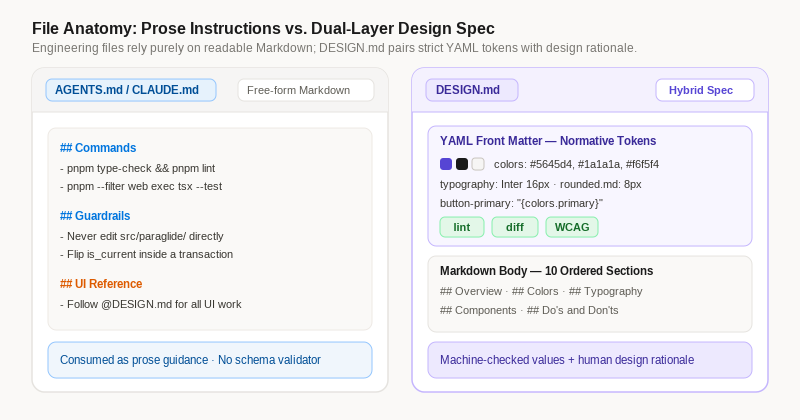
AGENTS.md and CLAUDE.md are free-form Markdown—there is no linter that checks whether a sentence inside AGENTS.md has a typo in a color token or an inaccessible foreground/background pair.
DESIGN.md, by contrast, binds normative YAML tokens to human design rationale in the same file:
- Top-level keys (
colors,typography,rounded,spacing,motion,components) hold exact CSS values and{token}references such as`{colors.primary}`. - Google Labs’ reference CLI (
npx @google/design.md lint DESIGN.md) catches duplicate sections, broken token references, and WCAG contrast warnings before code is even generated. npx @google/design.md diff DESIGN.md DESIGN-v2.mddetects token-level regressions across versions—something plain prose inAGENTS.mdcannot support cleanly.- Token trees can be transformed directly into Tailwind themes, CSS variables, or prompt exports without parsing English sentences.
3. Portability outside the repository
Engineering instructions are bound to one repository: pnpm --filter @designmdpro/web build means nothing outside that codebase. Visual identity, however, regularly leaves the repo.
Teams generate standalone landing pages, benchmark briefs, sales proposals, and prototypes in Google Stitch, v0, Claude, or ChatGPT where there is no local codebase at all. As we documented in our breakdown of Vercel’s design.md workflow, Vercel hosts a public vercel.com/design.md specifically so external agents can produce on-brand pages outside internal component trees. A standalone DESIGN.md transfers directly into those tools; an AGENTS.md does not.
4. Separate ownership and cleaner git reviews
Designers and design-system engineers update color semantics, typographic hierarchy, and component Do’s and Don’ts on a different cadence than backend engineers update database migrations or test commands. Separate files produce focused pull request diffs and clear ownership boundaries.
4. Wiring All Three Together in One Repository
In practice, the three files work best as a single pipeline with zero duplicated prose:
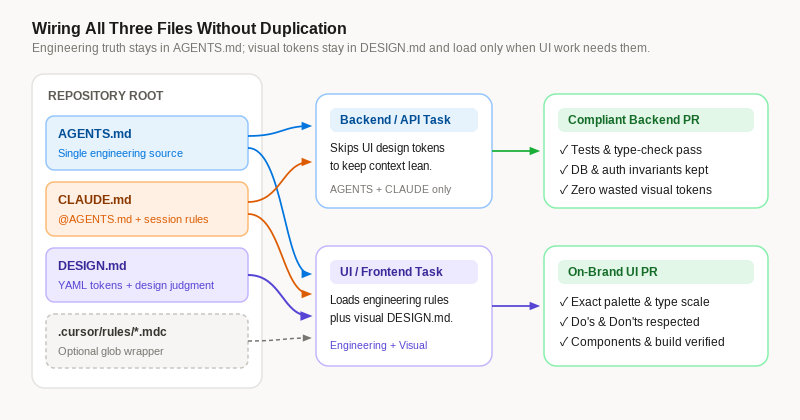
Step 1: Keep shared engineering truth in AGENTS.md
Put build/test commands, folder conventions, and code guardrails here, plus a one-line pointer to DESIGN.md so any tool (Codex, Copilot, Windsurf, Cursor) knows where the design system lives:
# AGENTS.md

## Commands

- Type-check: `pnpm type-check`
- Lint: `pnpm lint`
- Targeted tests: `pnpm --filter @designmdpro/web exec tsx --test scripts/test-<name>.ts`

## Engineering Guardrails

- Never edit generated files under `apps/web/src/paraglide/`.
- Wrap `is_current` revision updates in a database transaction.

## Visual Design System

- For UI components, layouts, and styling changes, read `DESIGN.md` at the repo root.
  Use its YAML tokens instead of inventing colors, radii, or font sizes, and follow
  its Do's and Don'ts.
Step 2: Make CLAUDE.md a concise Claude Code entry point
Import @AGENTS.md so nothing is repeated. Then decide whether DESIGN.md should be loaded unconditionally or on demand:
- UI-heavy frontend repo: include
@DESIGN.mddirectly inCLAUDE.mdso every session starts with full visual context. - Full-stack monorepo (APIs, workers, DB migrations, and UI): instruct Claude to read
DESIGN.mdwhenever editing frontend paths (such asapps/web/src/components/**orapps/web/src/app/**) instead of loading design tokens into every backend session.
# CLAUDE.md

@AGENTS.md

## Session Routing

- When modifying UI, pages, stylesheets, or marketing copy under `apps/web/src/`,
  read `DESIGN.md` before writing code and match its tokens and section rules.
Step 3: Keep DESIGN.md focused on visual tokens and judgment
Let DESIGN.md follow the DESIGN.md format specification—normative YAML tokens paired with concise Markdown sections (Overview, Colors, Typography, Layout, Components, Do's and Don'ts)—without any build scripts or git rules:
---
version: alpha
name: DesignMD Pro
colors:
  primary: "#5645d4"
  ink: "#1a1a1a"
  surface: "#ffffff"
  muted: "#f6f5f4"
  border: "#e5e3df"
typography:
  body-md:
    fontFamily: Inter
    fontSize: 16px
    fontWeight: 400
    lineHeight: 1.6
rounded:
  md: 8px
  lg: 12px
components:
  button-primary:
    backgroundColor: "{colors.primary}"
    textColor: "#ffffff"
    rounded: "{rounded.md}"
    padding: "10px 16px"
---

## Overview

High-contrast editorial workspace built on warm neutral surfaces and crisp hairline borders.

## Do's and Don'ts

- **Do** reserve `#5645d4` for primary actions and active navigation states.
- **Don't** invent custom shadows or border radii outside the `rounded` scale.
Step 4 (Optional): Glob-scoped wrapper for Cursor
If teammates use Cursor, you can keep a thin .cursor/rules/design-system.mdc file with path globs (apps/web/src/components/**/*.tsx) pointing to DESIGN.md (or wrapping it in an .mdc rule—the exact format DesignMD Pro’s Cursor export produces). That gives Cursor automatic path-based activation while DESIGN.md remains the single edited source.
5. Four Common Mistakes (and Where Each Rule Actually Belongs)
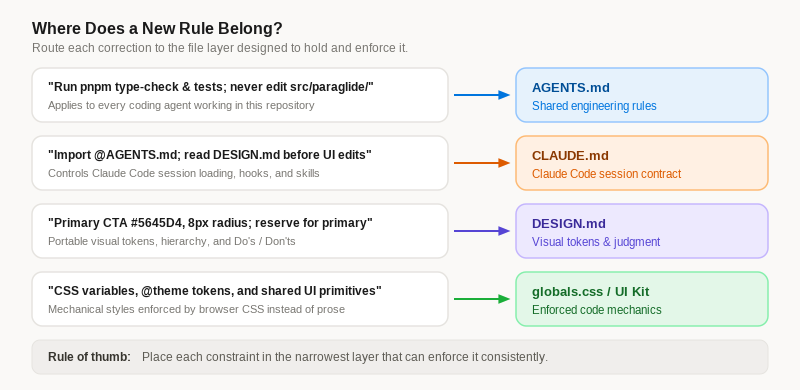
When reviewing an agent’s output or adding a new rule after a PR correction, route each rule to the narrowest layer built to enforce it:
- Copy-pasting
AGENTS.mdintoCLAUDE.md: One file gets updated, the other goes stale, and Claude Code ends up seeing conflicting rules. Use@AGENTS.mdinsideCLAUDE.md. - Putting color palettes and layout rules into
AGENTS.md: You losenpx @google/design.md lintvalidation, lose portability to Stitch/v0/chat workflows, and bloat backend agent contexts. - Writing
DESIGN.mdwith vague adjectives: Statements like “make the interface look clean and modern” produce random layouts across models. Pair exact YAML tokens with observable rules (“reserve#5645d4for primary CTAs; let comparison tables span full container width”). - Replacing CSS / component primitives with
DESIGN.mdprose:DESIGN.mdtells agents which tokens and patterns to select; your actual CSS variables (globals.css) and UI primitives (src/components/ui/) enforce spacing and styling mechanically at render time without consuming prompt tokens.
Ready to set up DESIGN.md alongside your AGENTS.md and CLAUDE.md?
- Explore production examples in the DesignMD Pro Discovery Gallery—every listing includes ready-to-copy formats tailored for Claude Code (
@DESIGN.md), Cursor (.mdc), and Stitch. - Review the full DESIGN.md Format & Token Spec or check your own file with the DESIGN.md Validator.
Updated November 22, 2026